Compress PDF to 1 MB
Need to get a PDF under 1 MB? Compress it directly in your browser and download a smaller PDF without installing desktop software.
Your files are never uploaded to our servers — all compression happens right inside your browser
Drop your PDF files here
or pick several files at once from your device
Choose PDF files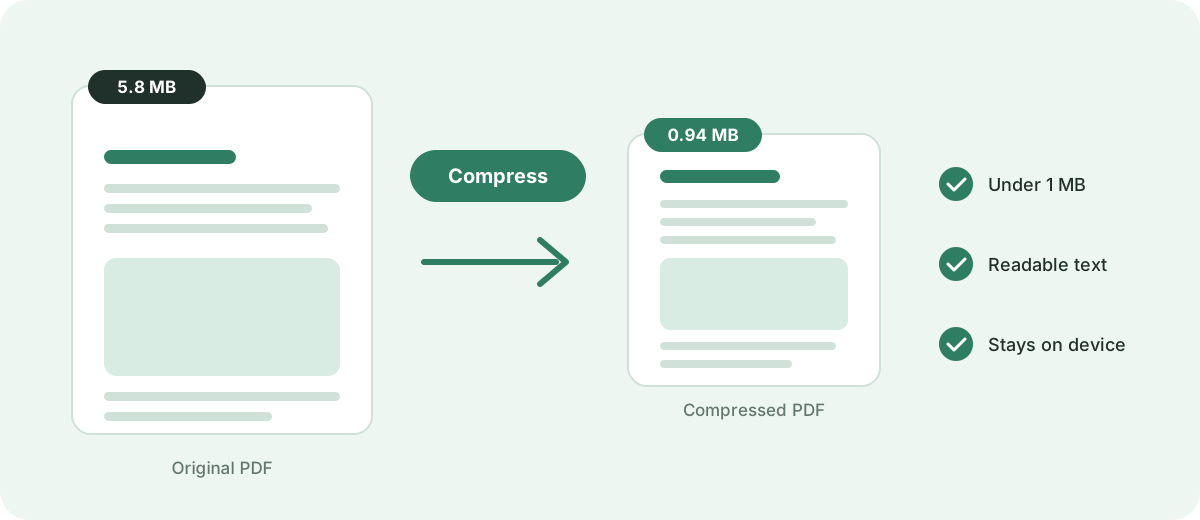
What this 1 MB compressor actually offers
Free to use
No subscription, no credit card and no watermark added to your document.
No sign-up
Open the page, add your file and compress it — no account needed.
Runs in the browser
The compression work happens on your device, not on a remote server.
Your file stays with you
The PDF is processed locally and is never uploaded anywhere.
Target size mode
The tool aims for 1 MB and tells you whether that size was reached.
How to Compress a PDF to 1 MB
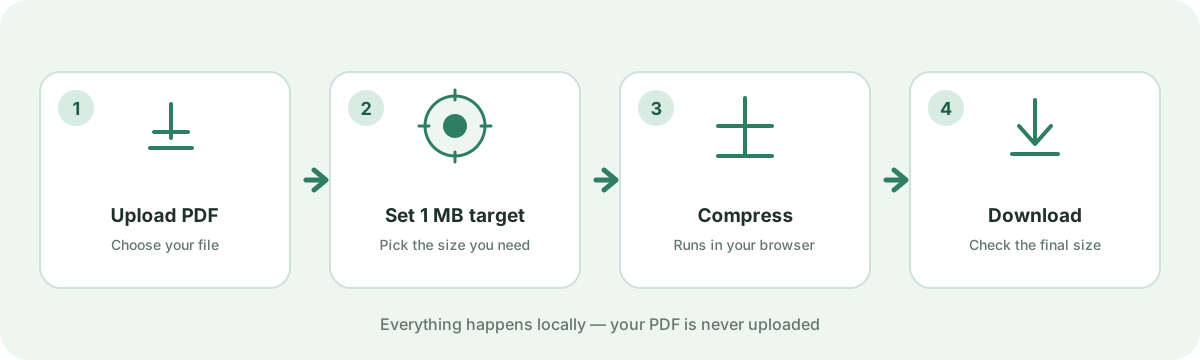
This page is already set to a 1 MB target, so you do not have to configure anything technical. The whole process is four steps.
- 1
Add your PDF
Drag the file into the box above or tap it to choose a PDF from your device.
- 2
Confirm the 1 MB target
The page is preset to 1 MB. You can compress several files at once if you have more than one.
- 3
Start compression
Press the compress button. The tool tests a range of settings and keeps the smallest result it can produce.
- 4
Download and check the size
Download the result and look at the reported final size. If it is still over 1 MB, the note next to the file will say so.
What Does It Mean to Compress a PDF to 1 MB?
A PDF measured at 1 MB is about one megabyte of data. Compression rewrites the file so it takes up less space while it still opens and reads the same way. A 1 MB target usually comes from an upload limit — an application form, an email gateway or a portal that refuses anything larger — rather than from a document needing exactly that size.
Two details matter in practice. First, “1 MB” and “under 1 MB” are not the same: a file of 1,000,000 bytes can still be rejected by a limit written as 1 MB if the limit is actually 1,000,000 bytes and your file is slightly over. Aim a little below the ceiling so you are not sitting on the edge. Second, results differ from file to file. A mostly-text PDF is already light and may barely shrink, while a file full of photos or scans can fall a long way. The same target can take a small step for one document and a large one for another.
Can I Compress a PDF to 1 MB?
Often, yes — but how easy it is depends on what is inside the file. The compressor can re-encode the parts that carry the most weight, and it will always return the smallest file it can produce, even when that is still above the target. These are the things that decide how far it can go:
- How many pages the document contains
- The resolution of images embedded in the pages
- Whether the pages are scans (pictures) or real text
- How much extra detail the graphics and charts hold
- How the file was exported and how well it is already optimized
From a larger PDF down to 1 MB
This is a rough sense of how much work the compression has to do — not a promise of a specific ratio. Two files of the same size can behave very differently depending on their content.
| Original size | Target | General difficulty |
|---|---|---|
| 1.2 MB | 1 MB | Small reduction |
| 2 MB | 1 MB | Moderate reduction |
| 5 MB | 1 MB | Larger reduction |
| 10 MB | 1 MB | Significant compression |
| 20 MB or more | 1 MB | Depends heavily on content |
Will Compressing a PDF to 1 MB Reduce Quality?
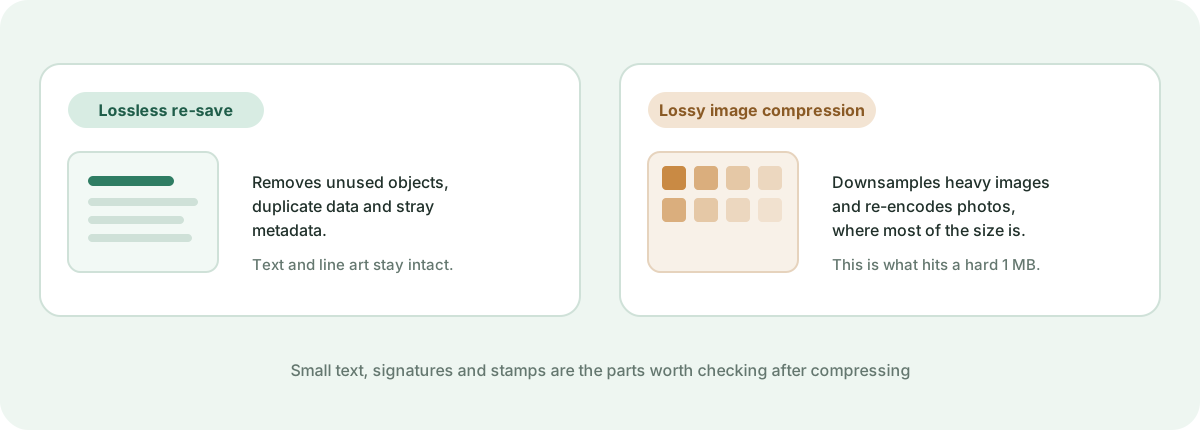
It depends on the file and on how much space has to be recovered. There are three outcomes worth separating. A lossless re-save removes redundancy without changing the pixels at all. Image compression, which is lossy, downsamples or re-encodes pictures, and that is where most of the savings come from. A document that is mostly typed text often looks essentially unchanged because text is small to begin with and there is little to gain from touching it. A file that is mostly photographs or scanned pages may need stronger image compression to reach 1 MB, and that is where you might notice softer detail.
Because of that, it is worth opening the result before you send it and zooming in on the parts that matter:
- Small print, footnotes and page numbers
- Signatures, stamps and seals
- Tables with fine dividing lines
- Diagrams, charts and maps
- Photographs, especially large ones
What Makes a PDF File Large?
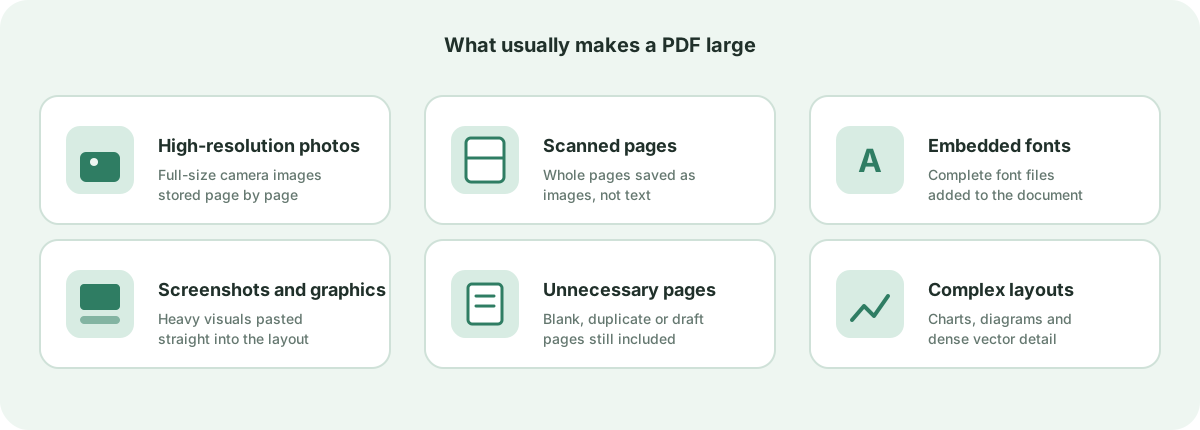
A PDF is a container. Its size comes from what has been packed inside it, and a few things tend to dominate:
- High-resolution photos saved at full camera or print size
- Scanned pages, where each page is stored as a picture
- Screenshots and exported graphics pasted straight into the layout
- Complete embedded font files rather than only the characters used
- Unnecessary blank, duplicate or draft pages
- Complex layouts with many layered vector elements
If you want to find out which of these is responsible for your own file, compress a copy to 1 MB and compare the result. If it shrinks a great deal, images or scans were the bulk. If it barely moves, the file is probably mostly text and is already close to as small as it will get without removing content.
How to Get a PDF Under 1 MB
The compressor can only work with what is in the file, so a few small edits in the source document before you compress can make the target much easier to hit:
- Delete pages you genuinely do not need — this has to be done in your PDF editor before compressing, since the compressor keeps the whole document
- Re-export or replace very large images at a screen-appropriate resolution
- Crop away wide empty margins so pages carry less content
- If a scan does not need colour, rescan it in grayscale or black and white
- Compress the revised file to 1 MB and check the reported size
- If it is still over 1 MB, try a smaller target such as 800 KB or 500 KB to give the engine more room to work
Compress Scanned PDFs to 1 MB
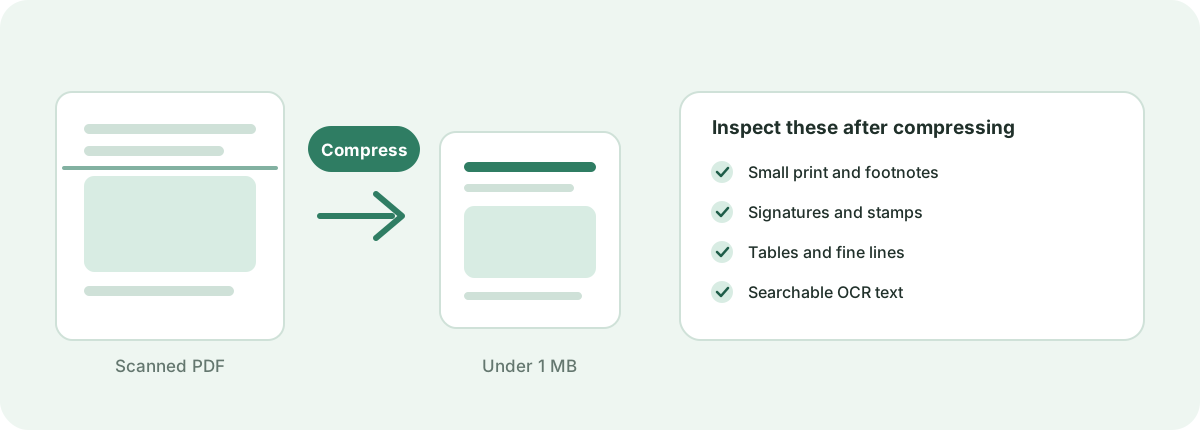
Scanned documents are the hardest kind to compress, because each page is a photograph of paper rather than searchable text. A 10-page scan at a high resolution can reach tens of megabytes even though it looks like a simple document. The compressor responds by re-encoding those page images, which is usually very effective — scanned files often fall by the largest margin of any PDF type. Because the result is image-based, check the details that carry meaning before you rely on it:
- Small print and handwritten notes
- Signatures, stamps and seals
- Tables and fine rule lines
- Any searchable OCR text layer you depended on
Why Is My PDF Still Larger Than 1 MB?
When the result is still above 1 MB, the tool shows that the target was not reached. That is information, not a failure — it means the document cannot lose that much without being damaged. The usual causes are:
- Pages that are full of photographs or detailed images
- Scanned documents with many pages
- A very high original image resolution
- Complex vector graphics, charts or maps
- A long document where every page contributes
What to try next: remove any pages you do not need, export images at a lower resolution, rescan in grayscale, or split a very long document into separate files. Then compress again. If the file is already mostly text, it may simply be close to its practical minimum, and the best move is to send it as it is or share it another way.
Compress PDF to 1 MB on Mobile
You do not need an app for this. Open this page in Chrome on Android or Safari on iPhone, then:
- Tap the upload area and pick your PDF from Files, Downloads or cloud storage
- Leave the 1 MB target as it is and start the compression
- Keep the tab open while it works — larger scans take longer on a phone
- Tap download and save the smaller PDF back to your device
Because everything runs in the browser, the same file that works on a laptop also works on a phone, with no extra installation and nothing sent to a server.
Is It Safe to Compress a PDF Online?
With this tool, your document is not uploaded. The compression runs inside your browser: the page is opened locally, the PDF is rebuilt on your own device, and the finished file is handed back to you as a download. Nothing is sent to a server to be processed, and there is no remote copy waiting to be deleted — closing the tab clears the file from memory.
That matters for documents that contain personal or sensitive information, such as identification papers, bank statements, contracts or medical records. If you want to confirm the behaviour yourself, open your browser's developer tools, switch to the Network tab, and compress a file: you will not see the PDF being posted anywhere. The page itself should always be loaded over a secure HTTPS connection, which is the case on this site.
When Should You Compress a PDF to 1 MB?
A 1 MB target comes up whenever there is a size ceiling between you and getting a document where it needs to go:
- Online application and registration forms with a maximum file size
- Job, visa, university or government document submissions
- Email attachments that are refused by a mail gateway
- Sharing a file over a slow or metered mobile connection
- Freeing up storage on a phone, laptop or cloud drive
1 MB is a common and convenient target, but it is not a universal standard. If the place you are uploading to states a specific limit, always follow that number rather than assuming 1 MB is required.
Ready to get your PDF under 1 MB?
Add your file at the top of the page, compress it with the 1 MB target, and check the final size before you download.
Compress a PDF to 1 MBFrequently asked questions
How do I compress a PDF to 1 MB?
Add your PDF to the tool at the top of this page, keep the 1 MB target, and start the compression. When it finishes, download the result and check the final size that is shown next to the file.
Can I compress a 2 MB PDF to 1 MB?
Often yes. Cutting a 2 MB file in half usually means moderate image compression. If the document is mostly text it may barely shrink, while a file of scans or photos can come down more easily.
Can I compress a 5 MB PDF to 1 MB?
This is a larger reduction and depends on the content. Image-heavy files usually reach 1 MB comfortably; a 5 MB document with little compressible image data may end up above the target, and the tool will tell you if it does.
Can I compress a PDF to less than 1 MB?
Yes. You can aim for a smaller target such as 800 KB or 500 KB instead. Setting a lower target gives the engine more room to work, which is useful when a form's real limit is slightly under 1 MB.
Will compressing a PDF to 1 MB make it blurry?
Not necessarily. Text and line art usually stay sharp because they are light to store. Blurriness, when it happens, appears in photographs and scans that have to be compressed hard to reach the target. Zooming in on the result is the quickest check.
Can I compress a scanned PDF to 1 MB?
Scanned PDFs are pictures rather than text, so they often shrink by a large amount. They can also be difficult if there are many pages at high resolution. After compressing, check small print, signatures, stamps and any OCR text you rely on.
Why is my PDF still over 1 MB after compressing?
It usually means the document cannot lose that much without being damaged. Many pages, high-resolution images, detailed graphics or long scans all make 1 MB harder to reach. Removing unneeded pages or lowering the image resolution in the source file is the most effective fix.
Can I compress a PDF on my phone?
Yes. The tool is a web page, so it works in Chrome on Android and Safari on iPhone with no app to install. Add the file from your device storage, let it compress, and save the result back to your files.
Does compressing a PDF change the document?
The compressor rebuilds and optimizes the file rather than editing your content, so the text and layout stay as they are. Very heavy compression can soften embedded images, and any existing digital signature may not survive a rewrite, so verify signed documents afterwards.
How can I keep my PDF readable after compression?
Use the smallest target that still meets your requirement, for example 800 KB rather than 1 MB if the limit allows it. After downloading, zoom in on small text, tables, signatures and photographs before you submit or send the file.
Is 1 MB a universal file size limit?
No. File size limits vary widely and are set by whoever is receiving the document. 1 MB is a common and convenient target, but always follow the exact number stated by the form or service you are uploading to.
Do I need to create an account or install anything?
No. The compressor is free, has no sign-up, and runs entirely in your browser. There is nothing to download or install, and your file is not uploaded to a server.
Are my documents uploaded to a remote server to reach this target size?
No. All target-size analysis, rasterization passes, and PDF rebuilds happen locally inside your web browser. Your private documents never leave your device.
Sources & further reading
Standards, official documentation, and technical references behind the guidance on this page.
- PDF 32000-1:2008 — Portable Document Format — Adobe / ISO
- File API — MDN Web Docs
- WebAssembly specification — W3C WebAssembly Community Group